We are excited to announce the release of Psono Gateway, a new way for teams to launch secure, browser-based SSH, RDP, and VNC sessions directly from connection entries stored in Psono. It brings secrets and remote access together in one controlled workflow, without requiring users to copy credentials or expose target systems directly to their devices.
Psono Gateway is available today exclusively for Psono Enterprise Edition and requires a valid Enterprise Edition licence. It cannot be used with the Community Edition server.
Remote Access from the Password Manager
Administrators often need both a credential and a separate tool to connect to a server, workstation, or other protected system. That creates extra steps and can encourage credentials to be copied into clipboards, terminals, or locally saved connection profiles.
With Psono Gateway, users can open an SSH, RDP, or VNC connection entry and select Launch. Psono resolves the permitted credentials, selects an available Gateway, and opens the session in a browser. The same workflow is available from the Psono webclient and the Psono app.
Psono Gateway is based on Apache Guacamole, the established clientless remote desktop gateway. We integrated Guacamole with Psono's encrypted secret handling, authorization model, Gateway clusters, and web and mobile clients to provide a purpose-built launch flow for Psono environments.
Key Features
- SSH, RDP, and VNC in the browser: Connect to Linux servers, Windows systems, and VNC desktops without installing a dedicated protocol client on the user's device.
- Flexible authentication: Use credentials stored directly in a connection entry, reference an Application Password, or use an SSH Key with a personal username.
- Encrypted launch handoff: The client encrypts the connection descriptor with a fresh launch key. The Psono server authorizes and routes the request without decrypting the target credentials.
- Short-lived, one-time launches: Every session starts with a temporary launch code that is consumed atomically and cannot be reused.
- Continuous authorization: Psono checks access when the session starts and revalidates active launches regularly, so revoked users, sessions, secret permissions, or Gateway access can invalidate a connection.
- Granular Gateway access: Administrators can make a Gateway cluster available to everyone or restrict it to selected users and groups.
- High availability: Multiple Gateway instances can join a cluster. Psono selects an active instance for each new launch, and users can choose between clusters when more than one is available.
- Deployment flexibility: The container includes the Gateway web application and a bundled
guacddaemon for SSH, RDP, and VNC. An externalguacdcan be used when stronger process or network isolation is required.
How It Works
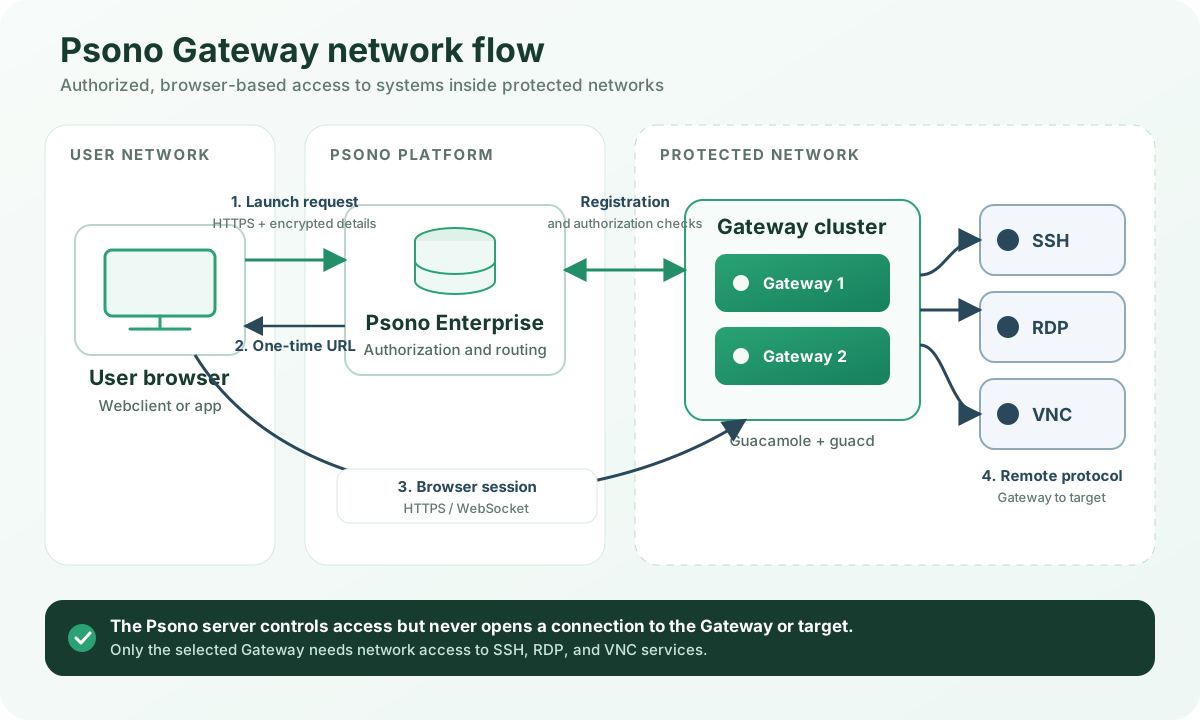
- A user launches a saved SSH, RDP, or VNC connection from Psono. The client resolves the connection's configured authentication source and encrypts the minimum required connection details with a new key.
- The Psono Enterprise Server verifies the user's token, read access to the connection entry, and permission to use the selected Gateway cluster. It then chooses an active Gateway instance and returns a short-lived one-time launch code.
- The user's browser connects directly to the selected Gateway over HTTPS. The Gateway atomically exchanges the launch code and decrypts the connection details in memory.
- The bundled or external
guacddaemon opens the SSH, RDP, or VNC connection from the Gateway's network to the target system. The Psono server never initiates a connection to the Gateway or the target. - While the session is active, the Gateway regularly asks the Psono server whether the launch remains authorized. Idle and absolute timeouts provide additional session boundaries.
This separation lets organizations place a Gateway close to protected systems while users only need HTTPS access to Psono and the Gateway. Firewall rules can keep SSH, RDP, and VNC services private and permit the Gateway to reach only the intended target networks.
Built for Controlled Enterprise Access
Gateway clusters can represent different locations, security zones, or environments. Administrators can assign users and groups to the appropriate clusters, monitor registered Gateway instances in the Admin Portal, and run multiple instances for availability. When users have access to several clusters, they can select the right route and optionally remember that choice for a connection.
Direct sign-in to Psono Gateway is intentionally unavailable. Every session must originate from an authorized Psono connection entry. Credentials are decrypted only by the selected Gateway for the launch and are held in memory for the remote session rather than being revealed by the Psono server.
Getting Started
To deploy Psono Gateway, enable the Gateway API on your Psono Enterprise Server, create a cluster in Gateway Management, configure its user or group access, and start one or more Gateway containers where they can reach the intended target systems. Users can then create SSH, RDP, or VNC connection entries and launch them from Psono.
The complete installation, reverse proxy, firewall, high-availability, and update guidance is available in the Psono Gateway documentation.